
1. Introduction and Overview
Last updated: 20 March 2026
Fusion Self Care Portal & Platform Overview
This document describes the features and functionalities available on the Netaxis Fusion platform.
Fusion is a cloud-native integration and automation platform that empowers Service Providers with white-labelled self-care portals, provisioning automation, number management, voice routing, and seamless connectivity to multiple UCaaS platforms and contact-center applications.
Provisioning and management capabilities are available through two primary interfaces:
- The Fusion Self Care Portal (web-based graphical interface)
- The Fusion REST API (programmatic access for automation and integration)
The platform is presented to end customers, resellers, distributors, and administrators primarily through the Fusion Self Care Portal (also referred to as the Portal). This guide covers all features and integrations supported on the latest Fusion release (1.6.3), with dedicated sections for the three core modules:
Fusion for Microsoft Teams, Fusion for SIP Trunking, and Fusion for AnywhereNow.
For detailed programmatic provisioning and management, refer to: Fusion API Specification
Purpose of the Fusion Self Care Portal
The Portal delivers intuitive self-service management for UCaaS, SIP Trunking, and Contact Center services. Administrators at all hierarchy levels may handle users, numbers, licenses, trunks, and call flows without IT intervention.
The portal is fully white-labelled at Group level (designated for Service Providers, Telcos, and System Integrators) and supports multi-tier indirect sales models.
Both the Portal and the Fusion API support full provisioning workflows, including:
- User and license management
- Number ordering, porting, and assignment
- Trunk and routing configuration
- Subscription and product entitlement handling
Key Benefits & Value Proposition
Fusion is a cloud platform that provides multiple UC integrations. Operators typically face several challenges in SIP trunk service delivery:
- Manual SBC configuration and provisioning
- Fragmented number and routing management
- Slow enterprise onboarding processes
- Complex multi-platform UC integrations
- Limited customer self-service capabilities
- Increased operational costs and error risks
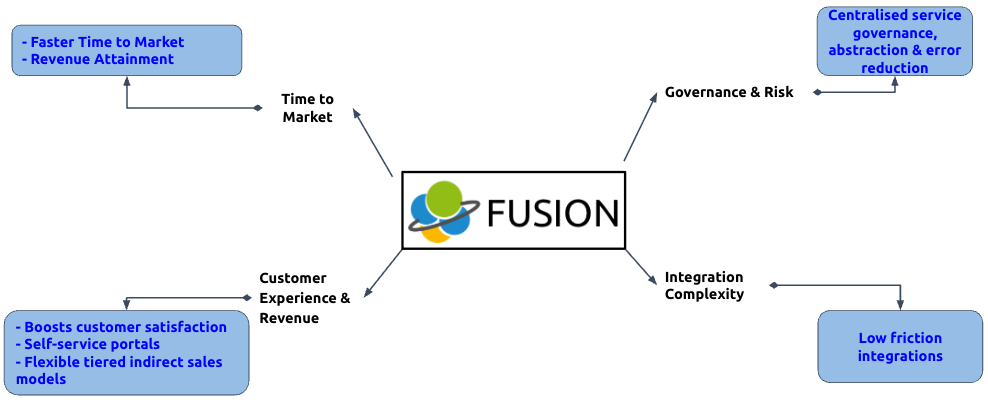
Fusion addresses these challenges by introducing automation, abstraction, and centralized service governance while delivering:
- Faster time-to-market through automation, white-labelled portals, and API-driven provisioning
- Seamless integration and activation with Microsoft Teams (Direct Routing & Operator Connect), SIP Trunking, and AnywhereNow Contact Center
- Future-proof modular architecture – add new UC platforms or applications without rip-and-replace
- Reduced operational costs via zero-touch provisioning, number management, built-in rating, self-service and API automation
- Enhanced customer satisfaction and revenue through self-service and tiered indirect models (Group → Distributor → Reseller → Tenant) with per-tier margins and rate plans
- Single docking station for multiple cloud UC platforms and value-added applications
Target Audience
- Administrators: Group, Distributor, Reseller, and Tenant levels for resource, user, and trunk management
- Developers / Integrators: Teams building custom automation, BSS/OSS integrations, or programmatic workflows via the Fusion API
System Requirements
- Web-based portal: modern browsers (Chrome, Firefox, Edge) on desktop
- API access: standard HTTPS client with authentication (API key / OAuth)
No OS prerequisites beyond internet access.
Glossary
- Fusion: Netaxis cloud platform for UC integration and automation
- Tenant: End-customer entity with subscriptions and products
- Subscription: Link to a specific UC platform/offering (e.g., Microsoft Teams tenant) with local billing ID
- Fusion Self Care Portal / Portal: White-labelled web interface for self-service management
- Fusion API: RESTful programmatic interface for provisioning, configuration, and management
2. Executive Summary & Value Proposition
Fusion acts as a “docking station” that connects Service Providers to multiple cloud UC platforms and applications while providing automation, self-care, and routing.
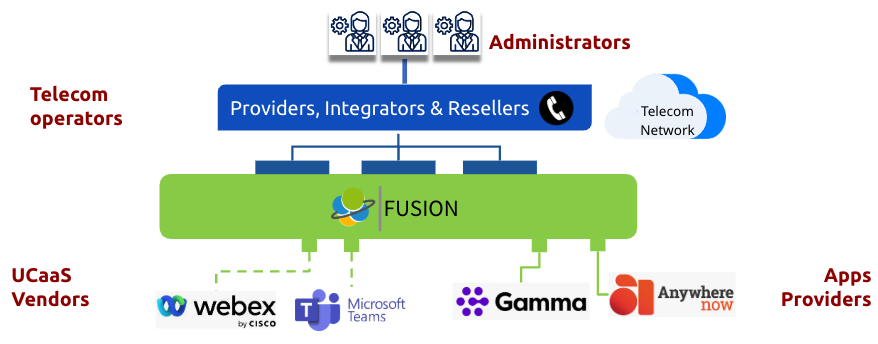
The Fusion Advantage: Integrate Once, Connect to Many
- Simplify – Abstract complexity of Microsoft Graph, PowerShell, SBC and contact-center APIs into a single user-friendly portal.
- Automate – Zero-touch user provisioning, number assignment, voice-routing policies, and AnywhereNow agent/supervisor management.
- Accelerate – Launch new UC services in days instead of months.
Tiered Indirect Model
Fusion supports a complete reseller hierarchy with per-group based branding, subscriptions and reporting.
Flexible SIP Integration Options
- MS Teams provisioning (with/without routing)
- Proxy or redirect modes with Fusion-managed or customer on-prem SBCs
3. High-Level Architecture
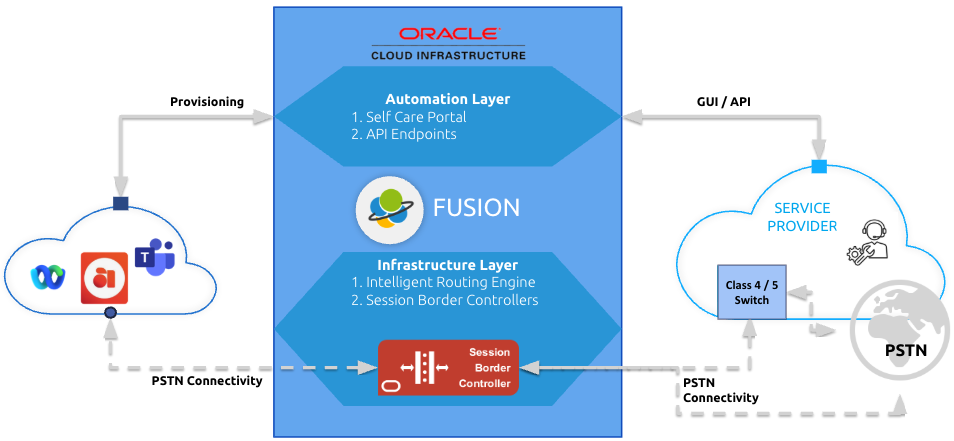
Fusion consists of three layers:
- Automation layer – self-care portal and API Endpoints.
- Infrastructure layer – Intelligent Routing Engine and Session Border Controllers for call control.
- Interconnect layer – Provider-managed PSTN connectivity.
The solution is hosted in Oracle Cloud (OCI) with optional on-prem deployment for specific projects.
4. Getting Started
Administrators log in via the Portal URL. Welcome emails with password-setup links are sent automatically. It is recommended to enable 2FA (Email) for security. It supports also SSO integrations.
Role-Based Access
- Group Admin: Full control over distributors, resellers, tenants, products, and settings.
- Distributor / Reseller Admin: Manage their subtree inclusive of tenants.
- Tenant Admin: Manage users, numbers, trunks, and UC-specific features within their tenant.
5. User Interface and Navigation
Modern multi-tenant administration portal with intuitive, hierarchical navigation.
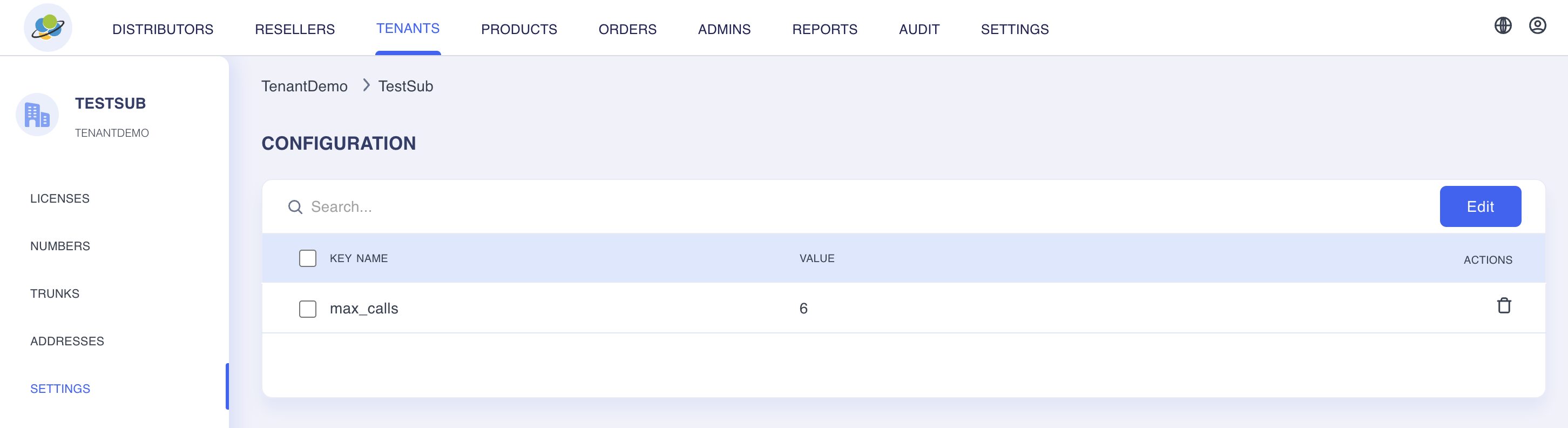
The left sidebar displays a collapsible, context-aware menu (Distributors → Resellers → Tenants) that adapts dynamically to the current hierarchy level. Breadcrumbs clearly show the navigation path (e.g., TenantDemo → TestSub), while global search and quick-access actions (Edit, delete icons) are available throughout. The main content area uses clean, card-based sections for key configuration categories:
- Licenses — searchable list view with inline editing
- Numbers — key-value configuration pairs
- Trunks — trunk settings (e.g., max_calls limit with delete action)
- Addresses and Settings — additional configurable modules
The interface features a prominent top navigation bar for switching between major sections (Distributors, Resellers, Tenants, Products, Orders, Admins, Reports, Audit, Settings) and includes user & global actions in the header.
6. Core Features and Configurations
- Number management (inventory per group)
- Product catalogue and ordering
- Audit log and reporting (CSV/JSON/XLSX export)
- Webhook and email event notifications
- Voice-routing policies, calling plans, block/allow lists
7. Admin-Specific Aspects
Group admins manage products, orders, admins, and global settings. Tenant admins focus on day-to-day UC management.
8. Security and Best Practices
Carrier-grade IAM with SSO (SAML/OIDC), MFA, and audit trails. Regular password changes are recommended.
9. Troubleshooting and Support
Built-in diagnostics and audit log. Release management follows standard Netaxis policy.
10. Identity & Access Management (IAM)
Supports Fusion as IdP, Microsoft Entra ID, Google, and OpenID Connect. Native Email 2FA (Email/TOTP/SMS) or third-party MFA via SAML/OIDC.
11. Platform Hierarchy & Entities
Fusion is a cloud platform that provides multiple UC integrations and utilises a structured, multi-level provisioning hierarchy.
The platform supports several distinct provisioning hierarchy levels. At the top is the Group (also known as the Service Provider) which is managed by a Group Administrator, which includes its own numbering management for importing number types, vanity numbers, and ranges, together with full branding capabilities. Groups function as Netaxis' channels.
Below each Group are optional Distributors (managed by Distributor Administrators) and Resellers (managed by Reseller Administrators) which may be defined. All three hierarchical levels — Group, Distributor, and Reseller — support the creation of Tenants, which represent end customers.
Orders are created against a Tenant and Subscription and fulfilled by the upstream hierarchy (Group → Distributor → Reseller). Each Order generates an entry at subscription level that contains multiple Products defined on the platform.
Every Tenant is assigned a unique UUID and may include an optional external billing ID. Products encompass technical resources (such as users and geographic numbers, for example UK or Belgium numbers), trunking subscriptions, customer licenses (including party license mapping for Microsoft Teams and custom license definitions), and license types with unique SKUs that administrators can create.
In the administrator interface, breadcrumbs display the current position within the hierarchy at all times. Comprehensive reporting on license usage and numbering usage is available and supports export in JSON, CSV, or XLSX formats. The platform maintains a complete audit log of all changes performed through the portal (reversion is not supported). The Settings menu provides access to event configuration, enabling all provisioning events to be delivered via webhook or email notifications.
Breadcrumbs always show the current location.
12. Fusion for SIP Trunking Module
Value Proposition
Operators typically face several challenges in SIP trunk service delivery (see Section 1). Fusion addresses these challenges by introducing automation, abstraction, and centralized service governance.
What the Module Provides
Fusion for SIP Trunking delivers a complete, automated trunking lifecycle within the Fusion Self-Care Portal. Administrators and tenants can access the following capabilities:
- Licenses – National and International trunks, including number entitlements
- Numbers – Direct assignment to trunks, with support for geo, non-geo, mobile, toll-free, and premium number types
- Addresses – Online regulatory validation
- Settings – Tenant-level configuration
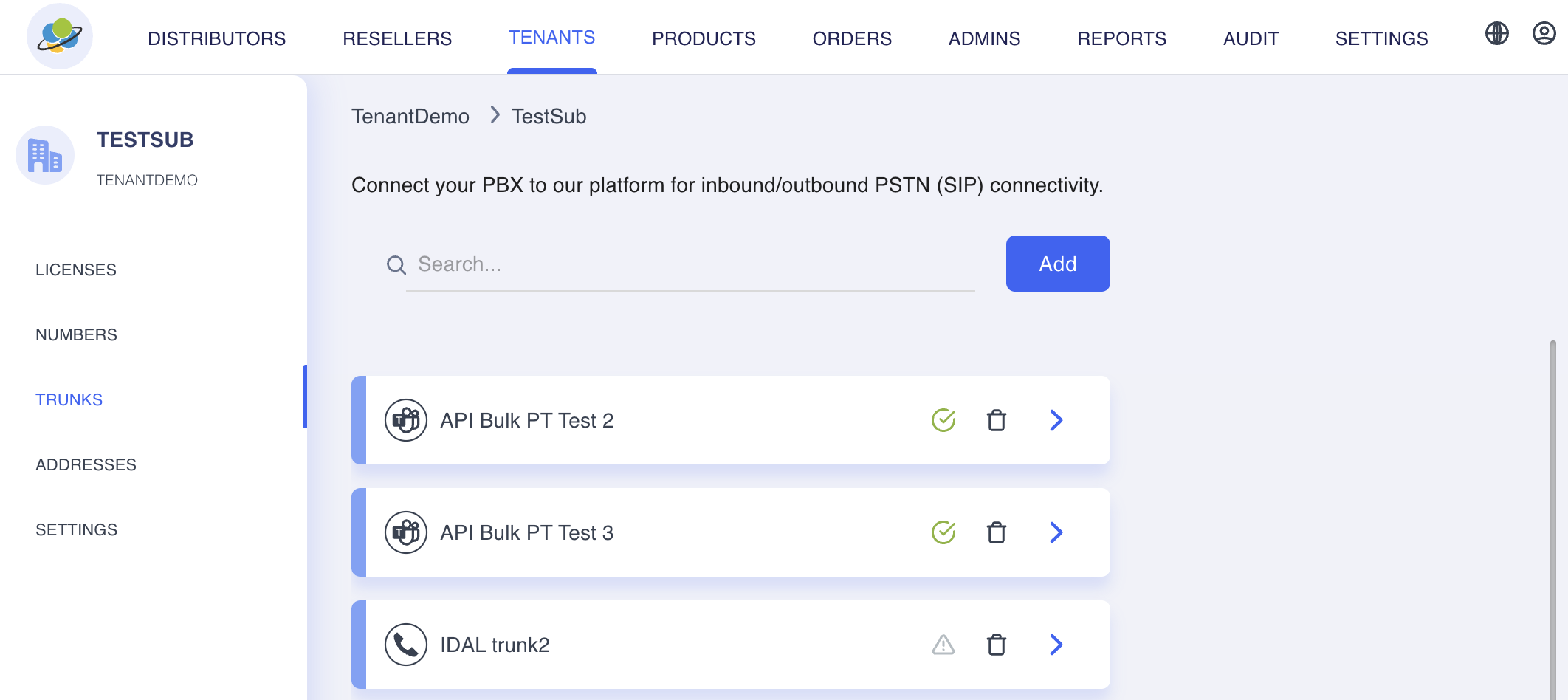
The Trunks menu enables one-click creation of SIP trunks to IP PBXs, IADs, Microsoft Teams, or other destinations. Each trunk displays its type, synchronisation status with the SBC, and a delete option.
Once a trunk is selected, operators can configure high-level options such as:
- Disaster Recovery – Takes precedence over all other routing
- Inbound/Outbound Calls – Activation control
Further configuration is available through dedicated tabs, including:
- Details & Settings – Trunk name, billing ID, and presentation formats, with SBC synchronisation visibility
- Capacity – Simultaneous call limits at trunk or subscription level
- DIDs – Assignment of pilot and additional numbers, including rewrite, divert, or per-DID disaster recovery
- Call Barring / Block List / Allow List – Granular call control
- Calling Plan – Country-specific destination classification, toggleable with admin-approval locks and executed after group-level block lists
- Access Trunks – Redundant Points of Presence (PoPs) with SBC provisioning, including Locale, Private Realm, Inbound/Outbound, SIP Options, Transport Type, and related settings
Benefits
- Accelerated service delivery – Automated provisioning of SIP trunks to IP PBXs, IADs, or Microsoft Teams reduces time-to-market from weeks to minutes
- Centralised control and governance – All trunk settings, capacity, routing policies, and disaster-recovery options are managed in one intuitive interface with real-time synchronisation to the Session Border Controller (SBC)
- Regulatory compliance and reliability – Built-in online address validation for emergency calling, flexible disaster recovery at global or DID level, and redundant Access Trunks support carrier-grade resilience and regulatory adherence
- Operational efficiency – Tenant-level calling plans, block and allow lists, number rewrite and divert options, and capacity controls provide self-service capability while maintaining full Service Provider oversight
- Multi-use flexibility – Supports SIP trunks for IP PBXs, IADs, Microsoft Teams Direct Routing, and other use cases from a single module, enabling multi-platform UC integration without additional tools
- Cost reduction – Self-care reduces manual intervention, deep-link number assignment streamlines operations, and detailed synchronisation status helps prevent provisioning errors
Summary
This unified, self-service approach gives Service Providers enterprise-grade SIP trunking with significantly lower operational overhead and an improved customer experience. By combining automation, centralized governance, regulatory controls, and flexible deployment options in a single module, Fusion simplifies SIP trunk lifecycle management while supporting scalability, resilience, and multi-platform integration.
13. Fusion for Microsoft Teams Module
Value Proposition
This capability provides a structured and centralized way to administer Microsoft Teams user provisioning within a tenant-based environment. It enables organizations to manage selected Microsoft groups and their associated users in a controlled manner, supporting consistent provisioning and policy assignment across the tenant.
By linking Microsoft Teams subscriptions to specific tenants, the module creates a governed framework for applying standardized configurations, licenses, and routing settings to users and service-related entities. This reduces administrative complexity, improves consistency, and supports scalable operations across enterprise environments.
What the Module Provides
The module supports tenant-level administration for Microsoft Teams environments where a valid subscription has already been assigned. Within each tenant, administrators can select Microsoft groups and then identify the users within those groups who should be tracked and managed for provisioning purposes.
A template-driven approach is used within each subscription to standardize key configuration elements, including:
- Location
- License assignment
- Voice routing policy
- Group association
- Customer license allocation
This template structure allows administrators to manage users individually or in bulk, using the User Principal Name (UPN) as the primary identifier for updates and provisioning actions. It supports both the creation of new user records and the update of existing ones, helping ensure efficient lifecycle management.
Benefits
- Centralized administration of Microsoft Teams provisioning activities within a tenant
- Standardized configuration through reusable templates for consistent policy and license application
- Improved operational efficiency with support for both individual and bulk user updates
- Reduced manual effort by streamlining provisioning workflows across selected groups and users
- Better governance and control through structured tenant, group, and user selection
- Scalable onboarding support by presenting key tenant subscription details after setup
Resource Account Management
The module also provides management capabilities for Microsoft Teams resource accounts, such as:
- Call Queues
- Auto Attendants
For these resource accounts, administrators can manage associated attributes such as:
- Phone number
- Voice policy
- Customer license
- Location
The current capability is focused on managing existing resource accounts rather than creating them. Creation of Call Queues and Auto Attendants is not currently supported within this module.
Post-Onboarding Visibility
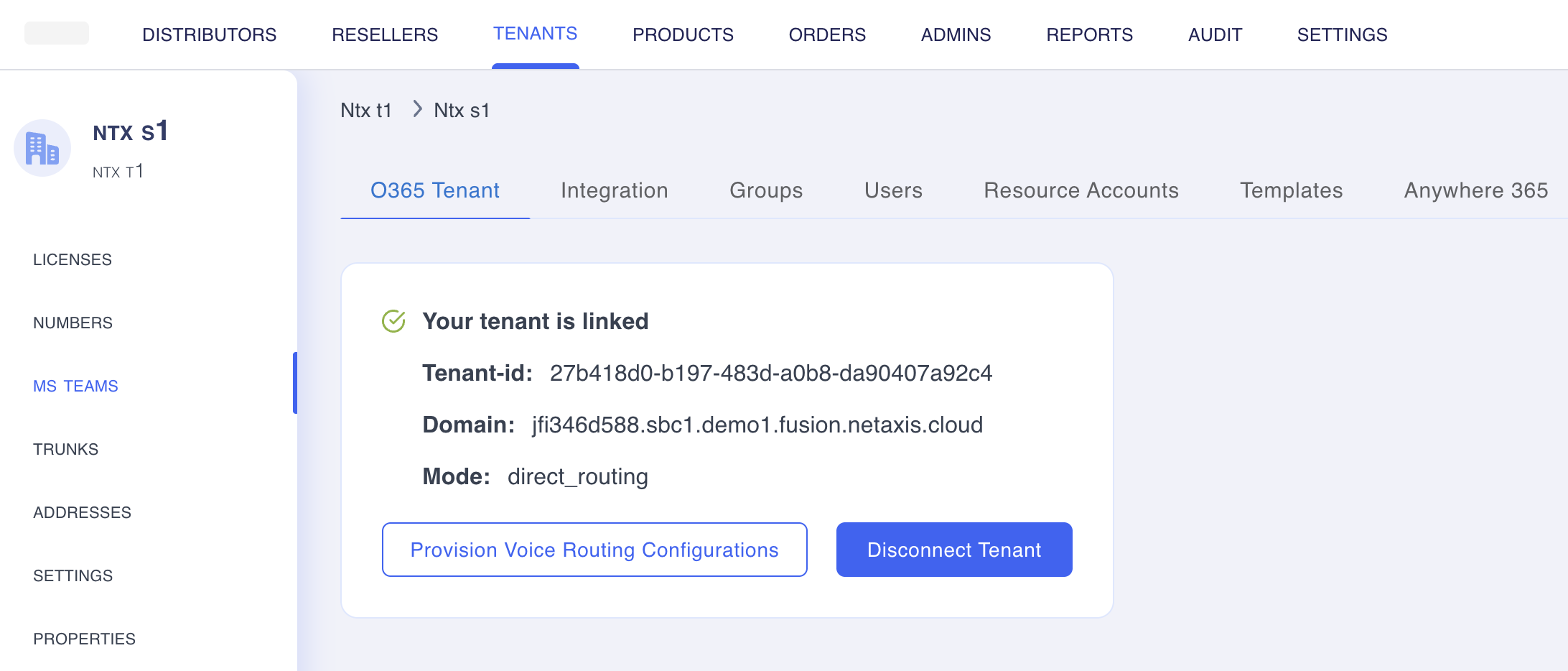
Once onboarding is complete, the module provides visibility into key tenant subscription details, including:
- Tenant ID
- Domain
- Mode
- Routing-policy provisioning status
This gives administrators an immediate summary of the tenant context and provisioning state.
Summary
This Microsoft Teams administration capability offers a professional, template-based approach to tenant provisioning and user management. It enables administrators to govern selected users from Microsoft groups, apply standardized policies and licenses, and manage key resource account attributes in a controlled and scalable way. Overall, it serves as a structured operational layer for Microsoft Teams administration, improving consistency, efficiency, and governance while providing a clear foundation for future enhancements.
14. Fusion for AnywhereNow Module
Value Proposition
The Fusion for AnywhereNow Module provides a centralized administration layer for integrating AnywhereNow Cloud Contact Center with Microsoft Teams. Once a Microsoft Teams tenant has been onboarded, the module extends the operational environment by exposing AnywhereNow management capabilities directly within Fusion.
This creates a more streamlined and governed approach to contact center administration by allowing organizations to manage relevant AnywhereNow site structures, agents, and supervisors from within the same broader service environment. The result is improved visibility, simplified administration, and more efficient management of contact center resources aligned to Microsoft Teams.
What the Module Provides
The module enables seamless integration with AnywhereNow Cloud Contact Center, which is certified for Microsoft Teams. Following Microsoft Teams tenant onboarding, an AnywhereNow tab becomes available, providing access to site and user management capabilities.
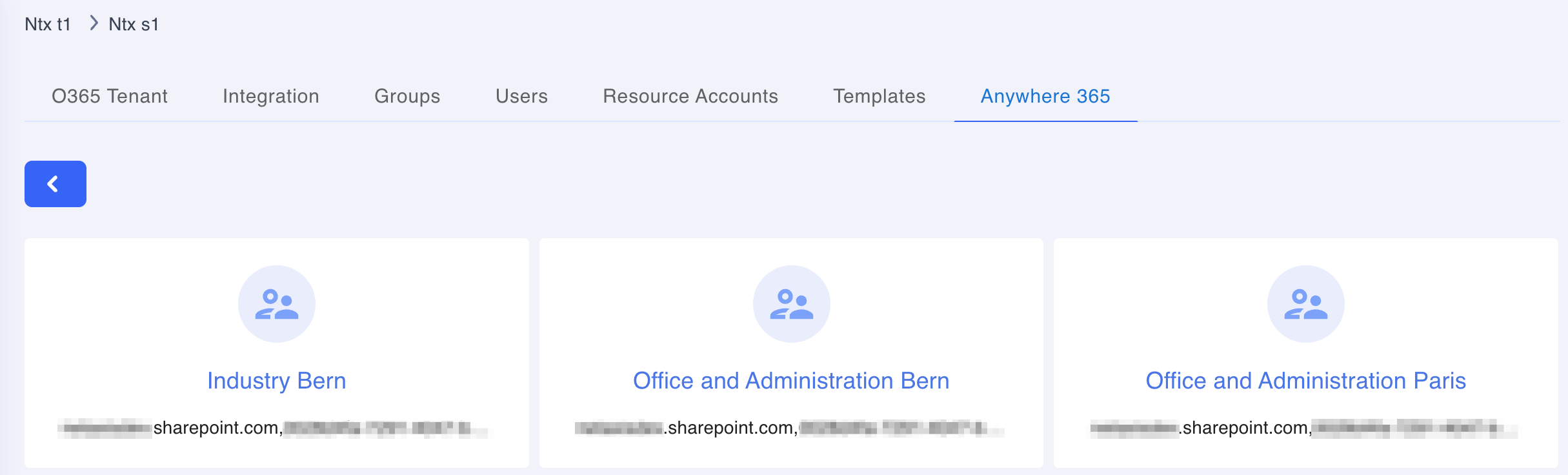
The module supports the following core functions:
- Linking of root sites, with automatic loading of all associated subsites
- Filtering and selecting sites to create a customized operational view
- Management of each subsite, including:
- Listing agents and supervisors
- Filtering agents
- Linking existing agents or supervisors
- Updating agent or supervisor assignments
- Removing agents or supervisors from a site
- Adding new agents with skills and scores, where skill definitions are maintained in the AnywhereNow portal
This structure enables administrators to manage contact center personnel and site associations in a more organized and accessible way.
Benefits
- Centralized management – Provides a single operational point for managing AnywhereNow-related administration within the Fusion environment
- Improved visibility – Enables clear oversight of root sites, subsites, agents, and supervisors across the integrated contact center structure
- Operational efficiency – Simplifies administrative tasks such as linking, updating, filtering, and removing users from specific sites
- Customised administration views – Supports filtering and selection of sites for more relevant and focused management
- Better alignment with Microsoft Teams – Extends the Microsoft Teams onboarding model into contact center administration through certified AnywhereNow integration
- Enhanced workforce administration – Supports the assignment and maintenance of agents with defined skills and scoring attributes, helping improve operational readiness
Summary
The Fusion for AnywhereNow Module enhances the Fusion platform by adding structured administration for AnywhereNow Cloud Contact Center within a Microsoft Teams-integrated environment. It provides administrators with controlled visibility and management of sites, subsites, agents, and supervisors, while simplifying day-to-day contact center administration. Overall, the module delivers a more efficient, centralized, and scalable approach to managing AnywhereNow resources as part of a unified communications and contact center ecosystem.
15. Number Management
Overview
The Number Management module provides centralized, group-level control over telephone number inventory. It acts as the single source of truth for numbering resources, enabling structured governance, efficient allocation, and seamless assignment to communication services such as Microsoft Teams and SIP trunks.
Value Proposition
Number Management combines powerful upstream inventory administration with intuitive downstream tenant self-service, delivering:
- Stronger numbering governance and compliance
- Reduced manual administration effort
- Faster provisioning of numbers to end services
- Consistent control across multi-tenant environments
Key Capabilities
Inventory Management (Group Level Only)
- Import and administration of:
- Number ranges
- Vanity / premium numbers
- Number entitlements
- Automatic validation of:
- Country codes
- Number types / categories
- Inventory structure
Tenant Self-Service
- Guided wizard for:
- Ordering new numbers
- (In supported jurisdictions) Initiating number port-ins
Number Assignment
Supported destinations:
- Microsoft Teams users
- Resource accounts (auto attendants, call queues, etc.)
- SIP trunks
Standard Numbering Workflow
- Import number ranges, vanity numbers, and entitlements at Group level
- Validate inventory categories, countries, and number types
- Publish validated inventory for downstream availability
- Allocate entitlements through products, subscriptions, or orders
- Assign numbers to active services (Teams users, resource accounts, SIP trunks)
Benefits
Centralized Governance
Single point of control prevents unmanaged or duplicate numberingOperational Efficiency
Bulk import, automated validation, and streamlined allocationTenant Empowerment
Self-service wizards reduce support tickets and speed up requestsFaster Service Activation
Rapid assignment from validated inventory to live servicesScalability
Handles large, multi-tenant numbering scenarios effectivelyService Flexibility
Native support for Microsoft Teams (Direct Routing / Operator Connect) and SIP trunking
Important Notes for Administrators
Tenants cannot directly create or import numbering inventory.
All inventory must be governed and imported at the Group (upstream) level.
Number Management is the authoritative source of controlled number availability for the entire platform.
Summary
Number Management establishes a robust, governed foundation for numbering resources. By tightly integrating group-level inventory control with tenant-friendly ordering and port-in capabilities, it accelerates service delivery, improves compliance, and reduces operational complexity across modern unified communications deployments.
16. Licensing
- Technical Resources: Numbers entitlements, MS Teams seats, AnywhereNow seats, SIP Trunking channels/seats.
- Customer’s Licenses: Microsoft-specific packs assignable to users/resource accounts (custom mappings and SKUs created by admins).
- Orders allocate resources to subscriptions.
- Reports show ordered vs. consumed licenses and SIP trunk capacity.
Contact sales@netaxis.be for platform quotes.
17. Service Transition & Support
Cloud-native (Oracle Cloud) with optional hybrid cloud architecture. Standard support for current and previous releases. Full audit trail and traceability for every change.